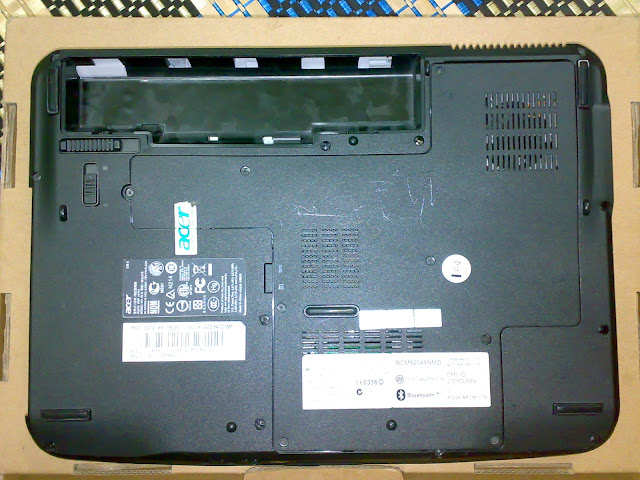
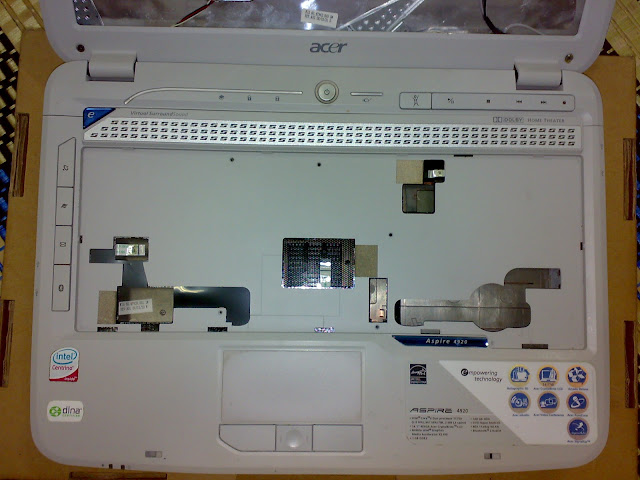
Acer Aspire 4920 Laptop Bottom Housing Case


Price: RM100
Code: AS4920-BTM

casing for laptop area:
Palmrest, Touchpad, and Bottom Base Case
without any panel or ribbon cable inside case.

Fit:
Acer Aspire 4310
Acer Aspire 4315
Acer Aspire 4315z
Acer Aspire 4710
Acer Aspire 4710z
Acer Aspire 4715
Acer Aspire 4715z
Acer Aspire 4920 4920G

Outlook: not very bad [good shape]
Condition: Used / second

======================================
contact: Mr Zul 0127319949
COD Area: Plentong, Masai, Pasir Gudang, Ulu Tiram,
----------- Johor Jaya, Taman Molek, Tebrau,
----------- or other area of Johor Bahru, or
----------- Segamat or Bandar Mas, Kota Tinggi Johor
Courier: by Pos Laju
Payment: Bank transfer or cash
Pos Laju Courier: + RM10

Dont forget to see my other ads.
======================================

Other services:
- Format or service laptop immediately at main area, other area can considered.
- Delivery at main area radius. other area can considered.
- Accept faulty, semi-faulty or used laptop.
- Laptop CPU Cooling Fan Services.

200712

Read More..

Acer Aspire 4310 4315 4710 4715Z Laptop Keyboard 2nd RM80


Acer Aspire 4310 4315 4710 4715Z Laptop Keyboard 2nd -RM80


Layout: US
Colour: White
Condition: used and tested ok

Compatible Series Models:
Acer Aspire 4220, 4310, 4315, 4720Z, 4220G, 4920, 4920G, 5220, 4320, 5310, 4520, 5310G, 4520G, 5520, 4710, 5710, 4710G, 5710G, 4710G-4A0508 5720, 4715, 4715Z, 5720G, 4720, 5910, 4720G, 5920

Outlook: not very bad [good shape]
system and hardware: still in good condition
Condition: Used.
Warranty: 1 month

======================================
contact: Mr Zul 0127319949
COD Area: Plentong, Masai, Pasir Gudang, Ulu Tiram, Johor Jaya, Taman Molek,
or other area of Johor Bahru [plus RM5], or
Segamat or Bandar Mas, Kota Tinggi Johor
Courier: by Pos Laju
Payment: Bank transfer or cash
Pos Laju Courier: + RM10

Dont forget to see my other ads.
======================================

Other services:
- Format or service laptop immediately at main area [free transportation], other area can considered.
- Free delivery at main area radius. other area can considered.
- accept faulty laptop or used laptop.
- Laptop CPU Cooling Fan Services.
Read More..

How Do I Get My Laptop Screen to Show on My Laptop a Remote Screen

Use another monitor with your laptop and enjoy better working conditions, while being able to open more programs at once. This is not only more useful for designers and graphic artists running Windows, but also allows you to watch a DVD on one screen while answering email on the other. You can also present to an audience while seeing on your laptop screen what they are seeing on the big screen. projector

    What You Will Need

  1. Hook up your second monitor using the VGA jack on the back or side panel of a laptop. Many people use a second monitor to work in more detail with higher resolution. This comes into its own when you work in design. You will need a decent-sized flat panel with a good resolution. Just about all flat panel monitors come with a VGA socket. Many come with a DVI socket, and some come with HDMI and DisplayPort sockets too. To hook up a Windows laptop, you will need the VGA socket.
  2. Connecting Up

  3. Connect up the second monitor to the laptop, using the VGA port, which is a multi-way blue-colored slanted socket. If you look at it, there are three sets of five sockets, making a 15-pin connection. Usually, the top part is wider than the bottom. Once the monitor is hooked up and switched on, you will need to go to the desktop on the laptop and right-click it to get the display settings. When the box opens, click "Properties" at the bottom. Next, on the far right tab, "Settings," you will see a grey window at the top with two boxes in it, numbered "1" and "2." With the display set to the monitor that you just hooked up, check the box next to the words, "Extend my Windows desktop onto this monitor." You will now need to adjust the screen resolution to get the right proportions. When you have got the correct resolution, (and this may be quite different from the laptop screen, particularly if the laptop is a "wide-screen"), move your mouse to the right of the primary screen (the laptop screen), and you will see the mouse cursor extend on outwardly to the second screen. Drag an application window on to the second screen. If you use Adobe InDesign, PhotoShop or Illustrator, you will find it easier to use the second screen for working in the design window, while administering your Windows laptop in the left screen. When it is all set up, you will wonder how you ever did without it.
  4. Using the Laptop Display To View A Presentation on a Projector

  5. Presenting to an audience is a snap when you have the show on a laptop, and you also have it displaying on a big screen coming out of a projector. Carefully unplug the second monitor from the VGA port and plug in the VGA cord from the projector. Now go back to the display settings again. You will need to go to the desktop on the laptop and right-click it to get the display settings. When the box opens, click "Properties" at the bottom. Next, on the far right tab, "Settings," you will see a grey window at the top with two boxes in it, numbered "1" and "2." With the display set to the monitor that you just hooked up, uncheck the box next to the words, "Extend my Windows desktop onto this monitor." With the system configured like this, you will also be able to view videos on the second display, be it a projector or a second monitor. Windows Media Player lends itself very well to this arrangement and always detects the second monitor when it is plugged in.

Read More..

WaterField Muzetto Laptop Bag Review

by Allison Johnson

If you think the way I do, youll agree that its easier to drop a few hundred bucks on a bag you can write off as an "investment piece." That seems to be the idea here - quality materials, good structure, and classic style that will stand up to several years of use.

WaterField Muzetto Laptop Bag Specifications:

  • Notebook Compatibility: Up to 13 inch notebook
  • Bag Dimensions: 14 x 11 x 2.5 inches
  • Construction: Leather exterior, metal hardware, nylon textile interior
  • Weight: 1.7 lb.
  • Price: $239.00 at www.sfbags.com

WaterField Muzetto Laptop Bag

WaterField is a San Francisco-based operation, turning out high-end bags and cases for laptops, iPhones and beyond. Their style is urban-meets-professional with an emphasis on higher quality materials. Of course, this all comes at a premium. The Muzetto laptop bag sports a hefty $239 price tag. Is the extra style and quality worth all of that extra cash? This is the question that weighed on my mind as I spent some time with the Muzetto bag slung over my shoulder.

Build and Design
The Muzetto is a messenger-style bag. Its vertically oriented, snug against the hip and takes up relatively little space. The large laptop compartment and a thin pocket on the back are lined in a bright orange material, making it easy to find objects buried deep inside the bag.

WaterField Muzetto Laptop Bag WaterField Muzetto Laptop Bag

The leather on the bags exterior is treated with oil before it reaches the consumer, so it should be weather-resistant. Metal d-rings connect the woven nylon strap to the body of the Muzetto, and a removable Velcro pad keeps it comfortable against the shoulder.

WaterField Muzetto Laptop Bag

Under the large, weighted flap youll find the main laptop compartment ready for a 13 inch notebook, a slightly smaller pocket and another shallow pocket for portable devices. WaterField keeps it simple, skipping the small pockets for pens and business cards that youll find on most business laptop bags. Unlike the large compartment, the pockets are lined in a darker textile, making it just a bit more difficult to find that tiny USB key you dropped into the bottom of the bag.

WaterField Muzetto Laptop Bag

One thing this bag lacks is substantial padding in the laptop compartment. The bag itself is sturdy, no doubt, but without an extra layer to cushion your notebook from the bumps of everyday use, youll want to invest in a sleeve as well.

WaterField Muzetto Laptop Bag WaterField Muzetto Laptop Bag

Performance
The Muzetto performs just as well as it looks. The hardware is sturdy and the shoulder strap is comfortable. Did we mention that it looks good? It does. It looks very good.

While taking the bag out for a spin, I was caught in a couple of light rain showers. Based on my experience, I can agree with WaterField and say that the Muzetto will stand up to a little bit of foul weather.

Its a slim messenger bag, but I found enough pockets and storage space for my Dell Latitude E6400, an Asus Eee PC 1008HA Seashell netbook, a slim point-and-shoot, and a few other small items. This filled the bag to capacity. You wont be able to fit too many bulky items into the Muzetto, but its spacious enough for a notebook and a couple of lifes necessities. For anything more, youll need to find a bigger bag.

WaterField Muzetto Laptop Bag

Conclusion
Ill just spell it out - I like this bag. Let me count the ways: premium materials, simple design, and comfortable to use. If it were up to me, it would pack a few small pockets for the hodge-podge of pens, gadgets and nonsense that I tend to carry with me everywhere. It would also cost about a hundred dollars less. Aside from that, the WaterField Muzetto is a very fine bag.

Pros:

  • Very attractive design
  • High-quality leather exterior
  • Gold lining in main compartments

Cons:

  • No small pockets for phone, iPod and other gadgets
  • Relatively high cost
  • Little padding in laptop compartment
Related links :
Read More..

Blog Archive

Powered by Blogger.